
Adam Fistler's Technology Projects

Adam Fistler - Mind, Meaning & Transformation
This repository contains the generated static HTML, CSS, and JavaScript files for the Adam Fistler - Mind, Meaning & Transformation website. The site is generated using Cinnamon (GitHub - apfistler/cinnamon) and contains the production-ready static files used for my work as a behavioral change consultant.
|
Cinnamon - Static Website Generator
Cinnamon is a Python-based static website generator and compilation framework that evolved from a simple script for replacing strings in HTML into a system for building and maintaining complete websites. It combines templates, structured YAML configuration and metadata, reusable HTML snippets, content organization, and custom processing logic to generate the finished HTML, CSS, and JavaScript that make up a website. Cinnamon was developed to provide the flexibility and control needed to build and maintain my own website without relying on WordPress, Bootstrap, React, or other large web frameworks. It is currently used to build https://www.adamfistler.com.
|
|
TxFx - Public Environment Configuration Script
This PowerShell script is a simple tool designed for setting up development environments on public computers, such as those available in libraries. The script facilitates the installation of local copies of essential tools like Python, Git, and Paint.NET, allowing you to work on projects even when you don't have access to a private computer.
|
CB Helper - Terminal Clipboard Utility
CB Helper is a Bash clipboard utility that uses the OSC 52 terminal protocol to transfer terminal data directly to the local desktop clipboard. It is designed especially for remote SSH sessions and AI-assisted troubleshooting, allowing command output, files, annotations, and diagnostic transcripts to be collected into a cumulative clipboard without manually scrolling through terminal output and selecting text. It does not require xclip, xsel, Wayland clipboard utilities, or a graphical desktop environment on the remote system.
|
Adam Fistler - Behavorial Change Consultant Website
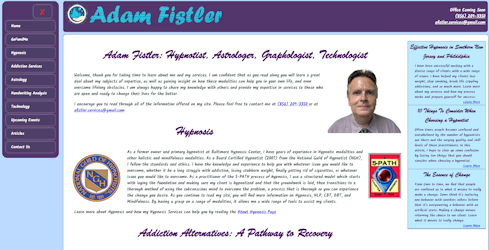
One of my proudest endeavors has been the creation of the Integrative Transformation Solutions website. Built entirely from the ground up, this project allowed me to dive deep into web development without relying on pre-existing frameworks such as Bootstrap or Materialize, or opting for a Content Management System like WordPress.
The Challenge
I intentionally embraced the challenge of crafting every design element from scratch. This decision stemmed from a desire to showcase my proficiency in HTML, CSS, and JavaScript. While the website draws inspiration from my earlier work on the Baltimore Hypnosis Center's website, which I founded in 2006, every line of code — HTML, CSS, and JavaScript — is a testament to the challenge of designing this website from the ground up.
A Touch of Collaboration
Acknowledging the power of collaboration, I sought assistance from ChatGPT. This AI tool played a pivotal role in handling generic code efficiently, providing valuable insights, and streamlining certain aspects of the development process. However, as any seasoned developer knows, while ChatGPT can be a powerful ally, it's crucial to approach its output with a discerning eye.
Crafting Complexity
Web development is not just about generic code; it's about addressing complex challenges head-on. In the process, I learned to navigate the intricate landscape of debugging, fundamental development, and bespoke design. Some of the code generated by ChatGPT sparked interest, occasionally revealing quirks and bugs. In such instances, my role was to design solutions independently and then collaborate with ChatGPT to refine and polish the final outcome, aligning it with my unique project requirements.
Embracing the Canvas: Navigating the Challenges of Learning Paint.NET in Website Design
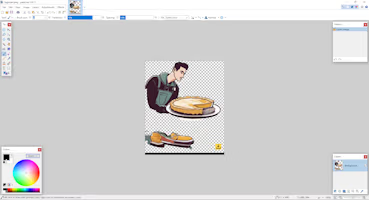
Learning Paint.NET presented a formidable challenge when embarking on the journey of website creation. As someone whose relationship with art had been distant and uneasy throughout life, the prospect of manipulating images was both daunting and terrifying. The necessity arose to delve into image editing for the website's visual elements, and Paint.NET emerged as an enticing option, offering a robust set of features and being freely available. Initially grappling with the basics, I turned to various resources, including YouTube tutorials and online forums, gradually gaining a foothold in understanding Paint.NET's functionalities.
The initial struggle evolved into a rewarding process over time. Through a combination of perseverance and exploration, I successfully crafted my website's logo by amalgamating disparate elements found online, subsequently modifying them to align with my vision. As the website expanded, so did the demand for image manipulation, whether it was editing stock images to fit my aesthetic or creating visuals from scratch. While some of the images on this site originate from stock sources, many have undergone significant modifications using Paint.NET to fulfill specific purposes.
Navigating the learning curve of Paint.NET has allowed me to grow more at ease with image creation and editing, enabling the seamless integration of tailored visuals into my web projects. The journey has not only enhanced my proficiency with this tool but has also instilled a newfound confidence in utilizing artistic elements to convey my ideas effectively.
Conclusion
The Adam Fistler - Behavioral Consultant website is a testament to my commitment to both craftsmanship and innovation in the world of technology. It reflects not only my technical prowess but also my ability to blend AI assistance with hands-on problem-solving. As you explore this site, I hope you appreciate the meticulous effort that went into creating a platform that mirrors my passion for web development.
Cinnamon
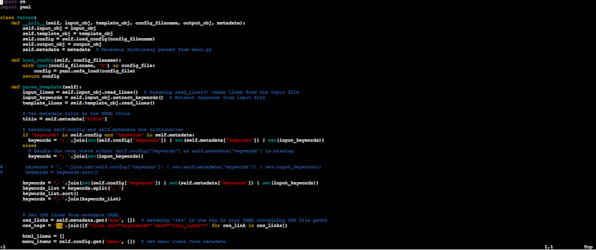
In parallel with my web development ventures, the evolution of my own generic static website generation tool, aptly named 'Cinnamon,' unfolded. Initially conceived as a straightforward Python script, 'html_gen.py,' its purpose was simple: amalgamate the main content of an HTML document with a template and menu. This involved basic text replacement, using strings like and in the template.
Simple Beginnings
Cinnamon began as a pragmatic solution to streamline content creation, sparing me from the tedious task of duplicating common elements across every HTML page. However, as any seasoned developer can attest, there's no such thing as a throwaway script. Scripts have a tendency to grow and evolve.
The Growth of Cinnamon
During a reflective moment on a walk, the name 'Cinnamon' materialized in my mind, and it stuck. As the tool expanded, so did its capabilities. Cinnamon grew to handle multiple sites, diverse templates, and introduced features such as reading configuration YAML files for site information, including name, address data, email, phone numbers, and menu generation data.
Handling Complexity with Metadata
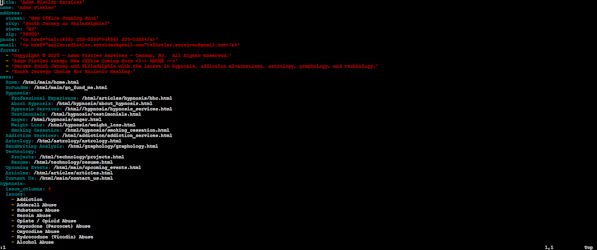
To address the intricacies of site management, I integrated a metadata file for each content HTML page. This file encompasses categories, page title names, keywords, and even manages complex HTML structures. For instance, the articles table on my page is dynamically generated from data in the site's metadata YAML file, allowing for easier maintenance and updates.
The Future of Cinnamon
Looking ahead, the future of Cinnamon involves a significant refactor. The goal is to create a system of cascading objects that handle different sites and subsites while abstracting complex HTML structures into repeatable, definable code snippets. This separation of data and design code facilitates easier management and customization.
Cascading Sites and Assets
In the envisioned future, Cinnamon will support cascading sites. The master configuration will contain generic metadata information applicable to all pages, along with a catalog of CSS and JavaScript files to be included across the entire site. Each page within the site will have its own metadata file, enabling further customization and overrides.
Moreover, the concept of assets will be introduced, allowing for a comprehensive catalog of assets, including CSS, JavaScript, and images. For instance, incorporating an image in any page of the site can be as simple as specifying , allowing Cinnamon to intelligently locate and include the image.
These advancements aim to streamline and enhance the development process, making the creation and maintenance of websites more intuitive and efficient.
Cinnamon: A Glimpse into the Future of My Website Development
In the evolution of my web development journey, Cinnamon has emerged as a valuable companion, shaping the way I approach and execute projects for my own websites. Initially conceived as a pragmatic solution for my specific needs, it has grown into a versatile tool, offering solutions to challenges inherent in managing multiple sites, diverse templates, and complex HTML structures.
As it stands, Cinnamon is well-suited to my particular requirements. However, I acknowledge its potential to extend its utility to a broader audience. The code, in its current state, is available on GitHub for anyone who might find value in its functionality. While it caters significantly to my unique needs, the ongoing process of refactoring and making functions more generic holds the promise of making Cinnamon adaptable to a wider range of web development projects.
In its present form, Cinnamon aligns with my vision of simplifying site management, especially for projects involving sites with intricate subsites. As I continue to refine the code, the goal is to create a more generic tool that separates HTML coding from data, making complex HTML structures repeatable through configuration files. I envision Cinnamon becoming a valuable resource for individuals and businesses alike—especially those managing complex site architectures or seeking to simplify their HTML structures.
Feel free to explore the code on GitHub, and as Cinnamon undergoes further refinements, I hope it becomes a useful asset for your own web development endeavors.
TxFX – Public Environment Configuration Script
TxFX is a PowerShell script that proves increasingly useful every day. It began as a configuration script for setting up public PCs, such as those in public libraries, and configuring my development environment. I initially created it for a web-based application, designed to process printed incident tickets and import them into an electronic database. TxFX facilitates the installation of local copies of Python and Git on public machines, overcoming the challenge of lacking admin access on these devices.
Originally named "Ticket Fix," TxFX has become my go-to script for efficiently configuring a development environment on public PCs in just a few minutes. Over time, I've expanded its capabilities to include handling Paint.NET, an essential tool for creating and editing images in web development projects.
The Future of TxFX
Currently, I am enhancing TxFX to handle a configuration file, defining the configuration data for desired applications. The ongoing modification aims to make the installation process more generic, accommodating various applications through '.exe' installers or '.zip' files that can be extracted locally. This approach allows for easy additions to the config file for installing other applications. Below is an example of the configuration file structure:
          project_dir:  "${env:USERPROFILE}/txfx"
          download_dir: "%{project_dir}/downloads"
          package_dir:  "%{project_dir}/packages"

          packages:
            git:
            arch:
              32bit: '32-bit'
              64bit: '64-bit'
            version:     '2.41.0.3'
            major_version:   '2.41.0'
            minor_version:   '.3'
            base_url:    "https://github.com/git-for-windows/git/releases/download/v%{major_version}.windows%{minor_version}"
            install_package: "Git-%{version}-%{arch}.exe"
            checksum:    'D7059A66B4598384CCD7DF4556AD59A516EE99A722C0D38E5DE75C1BAD39BA6C'
            install_dir:   "%{package_dir}/git"
            installer_type:  'executable'
            installer_arguments:
              - '/VERYSILENT'
              - '/NORESTART'
              - '/NOCANCEL'
              - '/SP-'
              - '/CLOSEAPPLICATIONS'
              - '/RESTARTAPPLICATIONS'
              - '/COMPONENTS=icons,ext\\reg\\shellhere,assoc,assoc_sh'
              - '/DIR=`"${PackageInstallDir}`"'
            path:
              - "%{install_dir}/bin"
            validation:
              "%{install_dir}/bin/git.exe" : '287359E8A1E8A016A600915E62119BB3EF927CAFFCD548B29C791329DCC1FC53'
            python:
            arch:
              32bit: ''
              64bit: '-amd64'
            version:     '3.11.1'
            base_url:    "https://www.python.org/ftp/python/%{version}"
            install_package: "python-%{version}%{arch}.exe"
            checksum:    '5BCF0CE02D6DE9EDEE44CC30287B59BBA3625089AC85F7486538BCD5D3766B37'
            install_dir:   "%{package_dir}/python3"
            installer_type:  'executable'
            installer_arguments:
              - '/quiet'
              - 'PrependPath=1'
              - 'Include_launcher=0'
              - "TargetDir=\"%{install_dir}/python3\""
            path:
              - "%{install_dir}/bin"
              - "%{install_dir}/scripts"
            validation:
              "%{install_dir}/python.exe":    '0CBF71EFA09EC4CE62D95C1448553314728ED5850720C8AD40352BFBB39BE99A'
              "%{install_dir}/scripts/pip.exe": '729BD920FD0B508CD67B234DDAE628CE65514C4F8166CFA8DEF2287655B7A0BD'
            paint.net:
            arch:
              32bit: ''
              64bit: '.x84'
            version:     '5.0.8'
            base_url:    "https://github.com/paintdotnet/release/releases/download/v%{version}"
            install_package: "paint.net.%{version}.portable%{arch}.zip"
            checksum:    '5BCF0CE02D6DE9EDEE44CC30287B59BBA3625089AC85F7486538BCD5D3766B37'
            install_dir:   "%{package_dir}/Paint.NET"
            installer_type:  'zip'
            path:
              - "%{install_dir}"
            validation:
              "%{install_dir}/paintdotnet.exe": '09970974D57248F852CD422ED2ED02ADC1391B97CA1671D3BD80818C8FEE76CE'
The changes in development not only streamline the installation process but also pave the way for greater flexibility and scalability of TxFX in managing different applications efficiently.
Conclusion
In the evolution of TxFX, from its origins as a pragmatic solution for configuring public PCs to its current state as a versatile PowerShell script, the journey has been marked by adaptability and innovation. Originally conceived for streamlining the setup of development environments, TxFX has grown beyond its "Ticket Fix" roots to become an indispensable tool, now extending its capabilities to include the seamless integration of Paint.NET for image editing in web development projects.
Looking ahead, the script's future is promising as it undergoes enhancements, particularly with the introduction of a configuration file. This modification not only signifies a leap in usability but also lays the groundwork for a more generic and scalable installation process. The envisioned flexibility to handle diverse applications through customizable configuration files is a testament to TxFX's commitment to simplicity and efficiency.
As the script evolves and embraces new features, it stands as a testament to the developer's ingenuity in overcoming challenges, be it configuring public machines without admin access or facilitating the swift setup of development environments. TxFX's journey reflects a commitment to continual improvement, making it not just a personal convenience but potentially a valuable asset for a broader audience seeking efficient environment configuration in their development endeavors. Explore the code on GitHub and witness firsthand how TxFX is shaping the landscape of environment configuration scripts.
Explore my Technology Resources
Contact Adam Fistler BCH - Behavioral Change Consultant
Examine a Brief Overview of Technology Background
Explore some Select Project's I'm Working On
Explore my Technology Articles
Outsorucing Your Agency: The Platform Wants to Be Your Higher Power
When the Machine Becomes the Scapegoat: Applying the Family Systems Model to Corporate America